Watershed is a climate technology company whose customers include some of the largest companies in the world—which means our team of just three data scientists gets a lot of questions internally about data. As a team, we support data ingestion, a footprint calculation engine, ESG reporting, customer enablement, and go-to-market operations, and a big part of our job is building dbt models: curated, tested tables that encode our business logic. Over several years we’ve built hundreds of them in BigQuery, and they power our dashboards, our ad-hoc analyses, and most of our executive reporting.
Here’s the problem we keep running into: the better our models get, the more context you need to use them correctly. And the number of people at the company who need answers from data has grown much, much faster than the number of people who can write correct queries against our warehouse. So we built Soup—a Slack bot and a Claude Code configuration that let anyone at the company ask questions about our data in plain English.
This post covers what we built, how we keep it safe but powerful, and what people across the company actually do with it. Stay tuned for a second post that covers the part we’re most excited about lately: how we’ve designed the system to improve itself, learning from its own failures.
The context problem
Take a simple question: “What’s our ARR?” (annual recurring revenue — the annualized value of our subscription contracts). Here’s what answering it correctly involves:
- There are six tables with “arr” in the name. Exactly one of them tracks paying, non-test customers—
core_data.arr_customers_daily_snapshot, a daily-grain table. - It contains projected future dates, so the sensible clause
WHERE dt = (SELECT MAX(dt) ...)hands you a date in 2027. Oops: you wantedCURRENT_DATE('America/Los_Angeles'), naturally. - Maybe you wanted monthly numbers anyway—that’s
is_last_day_of_month IS TRUE, which you may have never guessed existed.
That’s a lot to know for one of the most basic data questions, and it’s like this in every domain we support. It adds up to institutional knowledge that takes months to absorb. We’ve documented what we could, but documentation goes stale, and you already have to know a fair amount to find the right page.
So the questions came to us as Slack DMs instead: “which table has pipeline data?”, “does this include EU customers?”, “why doesn’t my number match the dashboard?” All reasonable questions, and we were happy to answer them. But a three-person team was the bottleneck for every data question at the company, and every hour we spent answering “which table?” was an hour we weren’t spending on higher leverage analytics.
What we built
Soup is a natural-language interface to our BigQuery warehouse, empowering an LLM with our team’s institutional knowledge of the data and a small set of read-only query tools. Ask it a question in plain English and it writes the SQL, runs it under a locked-down service account, and hands back the answer along with the query it ran.
We built it ourselves instead of buying an off-the-shelf AI querying tool, mostly for governance reasons. Our warehouse holds sensitive customer data with varying contractual restrictions, and we wanted fine control over row- and column-level access—with the default state of every table being “invisible until someone decides otherwise.” We also found that the core loop turned out to be simple, so building was cheap relative to the control we got.
Soup started as a Claude Code configuration, leaning on two things.
First, is our dbt models themselves: they enshrine the institutional knowledge that correct, reliable queries depend on, including common joins, grain definitions, and frequently used filters. As Soup reads models’ SQL before writing queries with them, every model our team builds can double as documentation that the LLM can reason about.
Second, is the configuration itself, a CLAUDE.md file and read-only BigQuery MCP connection. This supports the models by pointing the LLM at the right ones for each business question, adding the gotchas the SQL can’t express, and supplying the performance and cost guardrails (read-only access, dry-runs before expensive queries, capped scans).
With the models and enough instruction, Claude could answer most of the questions landing in our DM’s. This version still works great if you and your team are comfortable in a terminal; for us, we’ve packaged it as an internal Claude Code plugin, and it’s where we prototype new capabilities.
Most of the folks who need data answers don’t live in a terminal, though, so we built a Slack bot. Add Soup to a channel and send @soup what is ...?, DM it for private questions, or react to any message with a 🍲 emoji to have Soup answer it. It replies in the thread with an answer, a CSV of the full results, and the SQL it ran.
The whole system looks like this:
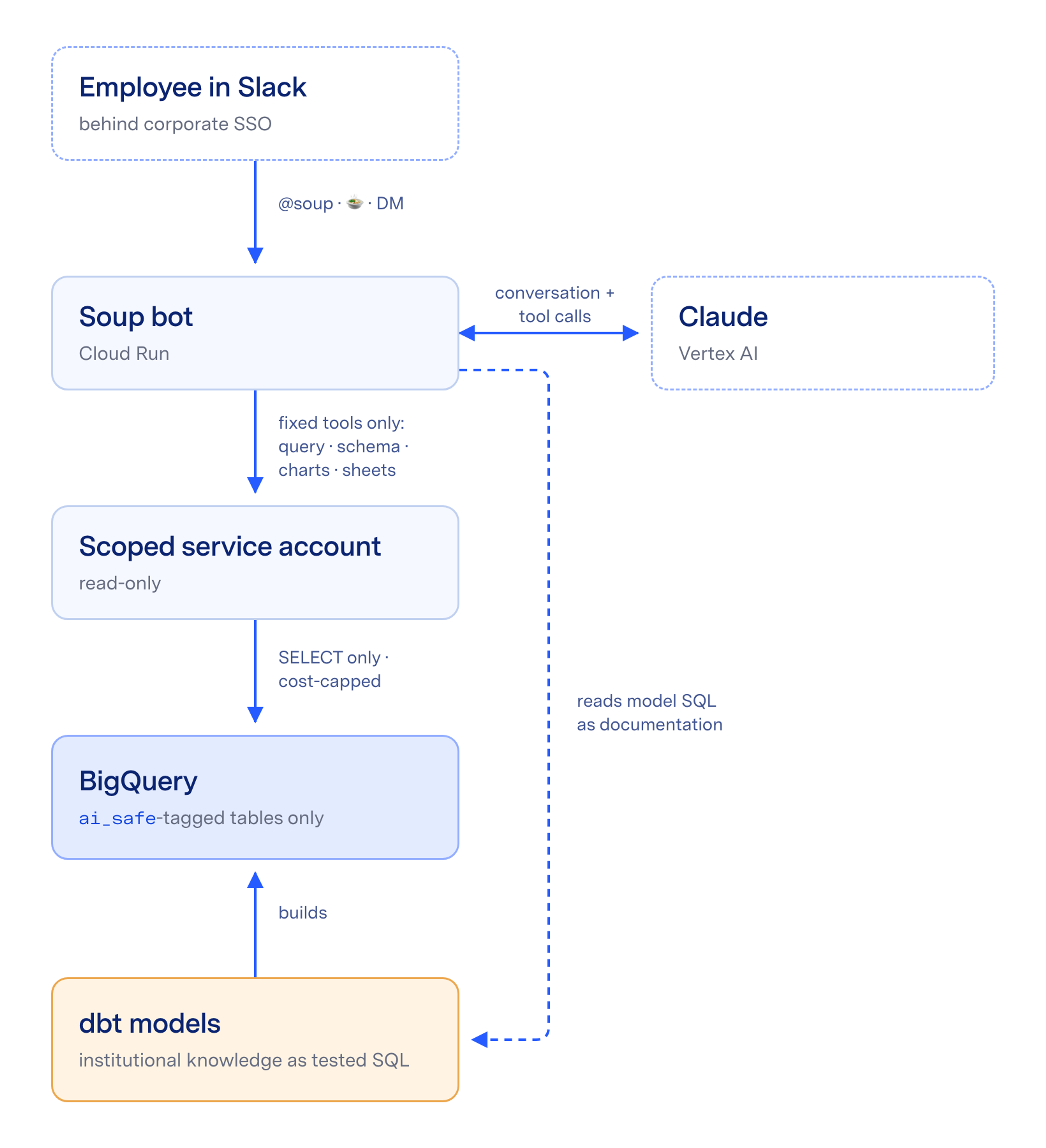
To keep the system secure, Claude is unable to run arbitrary code on our server; it can only pick from about a dozen hardcoded tools (run a query, describe a schema, read a dbt model file, render a chart, etc.), and each tool validates its own inputs. Because the same configuration and model files underlie both Claude Code and the Slack bot, updates that we make are picked up identically by both interfaces.
What people actually do with it
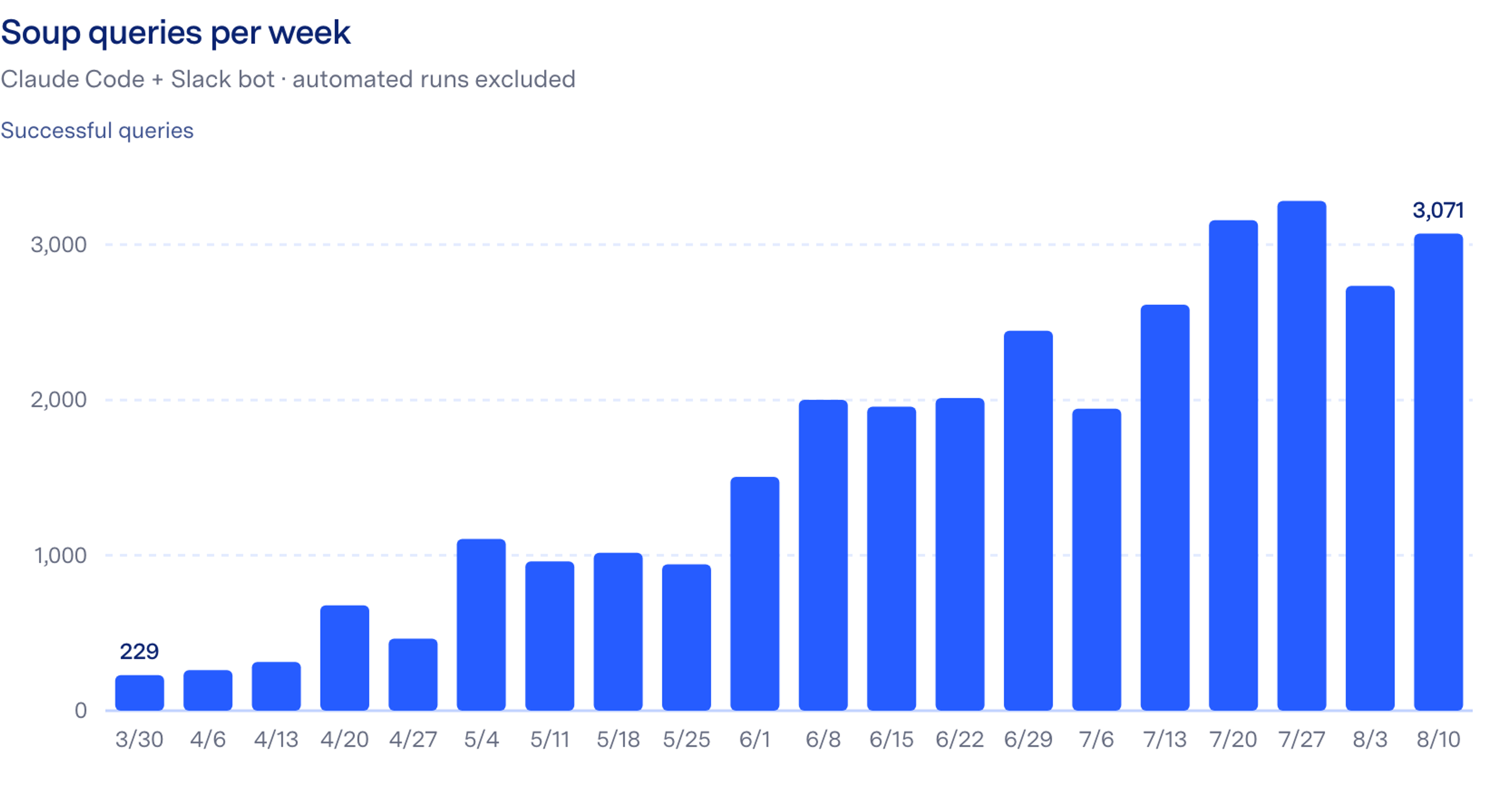
Adoption has spread organically, with people seeing answers showing up in threads and trying their own questions. The most popular feature we built is a query scheduler that runs a query on a user-specified cadence and reports to a Slack channel. Our heaviest non-analytics users are on the implementations, customer success, and go-to-market teams, asking things like “what’s our pipeline by region?” and “which customers renew next quarter?”—each of which used to be a message to us and a bit of a wait.
Every answer collects 👍/👎 reactions, and the upvoted threads give a good picture of what actually lands:
- Prep before a customer conversation. Pulling an account’s product usage and utilization, or asking “what benchmarking data might this customer find interesting?” minutes before a call, then narrowing it by industry and company size in the same thread.
- Revenue and funnel questions. “What was our ending ARR as of last January?”, closed-won summaries for a quarter, lead analyses grouped by account temperature.
- Measurement operations. “How long does the average customer take from starting a measurement project to approving a footprint?”, or counting customers who started a new project in the last 90 days.
- Configuration audits. Listing every org where a feature setting is enabled but the corresponding snapshot field is missing—the kind of consistency check that used to mean someone writing a one-off script.
- Iterating in-thread. People refine rather than re-ask: “exclude the quarters where we didn’t have enough data, and cite that on the chart,” “now count by org, marking demo vs. real,” “what about earlier years?”
Engineers found their own uses. Once, when a data-consistency alert fired, an engineer put a 🍲 on the alert message, and Soup traced the affected records across our US and EU BigQuery projects. It found four instances of the same problem (a deletion on one side that never propagated to the other), including two older cases nobody had noticed, across foreign-key relationships that are documented nowhere outside application code. The whole investigation took about a minute.
Where it falls flat
The failures cluster into a few patterns, and they have been as informative as the wins.
- Questions about product areas where we haven’t built curated models yet. The raw data usually exists, but Soup has to fall back to browsing raw schemas, and quality drops—it gets slower, misses filters, and sometimes picks the wrong table outright.
- Questions about data that isn’t in BigQuery at all. Soup used to guess at a plausible-sounding table, which was worse than admitting ignorance, so the guidelines now say explicitly what isn’t available.
- Plausible-but-wrong answers on curated tables. Soup can apply the wrong filter or misread a question—“ARR by segment” when you meant “by tier.” These are the hardest to catch because the output looks fine. We show the SQL in every reply, which helps if (big if) the user reads it. The best fix we’ve found is giving the bot a canonical vocabulary for the questions people ask most—more on that in part two.
- One structural limit: the tool harness is rigid on purpose. Adding a capability means writing and reviewing a new tool. There’s no config flag that quietly widens what the bot can do, which is exactly what you want for governance and occasionally annoying for feature work. We’ll take that trade.
Every failure tells us where to build next
Failures directly map to work we can do.
- A missing data source goes on the ingestion roadmap.
- A domain with no models gets queued for modeling.
- A wrong-table error becomes a one-line guideline fix that helps every future user.
We used to learn what people wanted from the warehouse largely through meetings and surveys in which we’d solicit active feedback; now we can observe the questions people actually ask. The dbt models are what make the AI useful in the first place, the AI’s failures tell us where to invest next, and since the bot reads model SQL before it queries, every model we ship improves every future answer with no changes needed for the bot itself. And in Part Two you can read more about how the feedback cycle makes Soup even richer.
Keeping it safe
Giving an AI system read-access to a production warehouse deserves significant rigor; we’d encourage you to spend a disproportionate share of build time on governance.
Two choices in that stack matter most.
- First, opt-in tagging: the failure modes aren’t symmetric. Forget to block a table in an opt-out world and you’ve exposed it; forget to tag a table in an opt-in world and a query fails, which is safe.
- Second, the bot’s reach stays inside the existing perimeter. Employees can already see much of this data through dashboards and other internal tools, so Soup changes the interface (natural language instead of SQL) without widening what any one person can access.
The fixed-tool design also puts a ceiling on prompt injection. Claude chooses which tool to call and with what arguments, but the tools are hardcoded and validate their inputs—no code execution, no shell, no general network access— so an adversarial input can’t escalate past read-only queries on tagged tables. In practice the worst case is a wrong answer, and wrong answers get caught by the review loops we’ll cover in part two.
What we’d tell another data team
You don’t need hundreds of models to start. Quality tracks model coverage, so twenty good models covering your core metrics would make a useful tool for those twenty topics. Our stack is BigQuery, dbt, and Claude on Vertex AI, but the pattern should carry to any warehouse and modeling framework: give an LLM read access, point it at your transformation layer as documentation, and constrain it to a small set of safe tools. The cheapest possible test is the terminal version—a configuration file describing your data and a read-only connection. If that can answer your team’s most common questions, a chat bot is an interface on top of something you’ve already proven.
Soup convinced us that our years of modeling investment had been compounding in ways we hadn’t fully appreciated. The models we built for dashboards turned out to be a rich enough stock—with instruction—for an AI system to serve thousands of queries across the company. Where the models are strong, the answers are strong. Where they’re thin, we know where to build next.
Turns out, you can make a pretty good soup with what you’ve already been cooking.
As it happens, realtime observability into the questions folks are asking, and feedback on what Soup does and does not do well, provide incredibly powerful signals for what our team can build and better support moving forward. To learn more about that, and how our non-analytics teammates are organically helping us build a tier of highly trusted data, check out Part Two of this series!